Custom public booking page
Your own branded page at yourdomain.com/username/event-slug with a clean, modern design.
Smart scheduling for professionals and growing businesses.
No credit card required. Share your booking page in minutes.
Select a date & time
TryMeetIQ connects your calendar, Google Meet, email and WhatsApp to make scheduling and meeting reminders completely automatic.
From booking pages and real-time calendar sync to WhatsApp reminders, CRM, and billing — all in one place.
Your own branded page at yourdomain.com/username/event-slug with a clean, modern design.
Each event can have its own duration, buffer, minimum notice, and max booking window.
Busy times update instantly via push notifications; deleted or moved events auto-reconcile.
Set weekly hours and one-off date overrides for holidays or special working days.
One booking can create a full weekly series automatically.
Multiple attendees can book the same slot with a configurable capacity cap.
Automatic Google Meet link generation on every confirmed booking.
Video call, phone, in-person, or custom link — configurable per event.
Invitees can reschedule or cancel via a secure link — no account required.
Inline or popup-button embed on any external website or CMS.
Automated email confirmations and reminder emails keep everyone on track.
WhatsApp confirmations and reminders are sent from the host's own number.
Up to 3 reminder slots each for email and WhatsApp, set independently.
Turn confirmation, cancellation, and reschedule notifications on/off per channel.
Every invitee is tracked automatically with notes, follow-up dates, and CSV export.
Move contacts through New → Interested → Follow-up → Demo scheduled → Won/Closed.
Trends, confirmed/cancelled/no-show breakdown, no-show rate, and top event types.
Detect cancellations caused by deleting the event directly in Google Calendar.
Manage all bookings in one place and mark no-shows easily.
Quickly copy email and phone numbers for outreach.
OAuth-connected real-time two-way sync.
Google Meet links auto-generated on confirmation.
Get booking created, cancelled, and rescheduled events for Zapier, CRM, or custom systems.
Drop a small script on any site or CMS to enable booking anywhere.
Free + paid tiers with feature gating for WhatsApp, reminders, and the Contacts CRM.
Upgrade instantly via Razorpay checkout inside the app.
View payment history, manage your plan, and download invoices from your account.
People can book, reschedule, or cancel without creating an account.
We clearly explain what Google Calendar data is used for before you connect.
Calendar data is only used for scheduling — never for ads, profiling, or AI models.
Every booking triggers an instant confirmation and a timed reminder sequence on WhatsApp and email — automatically, in your brand voice, with zero manual follow-up.
Automated reminders reach your clients on WhatsApp and email at exactly the right moments.
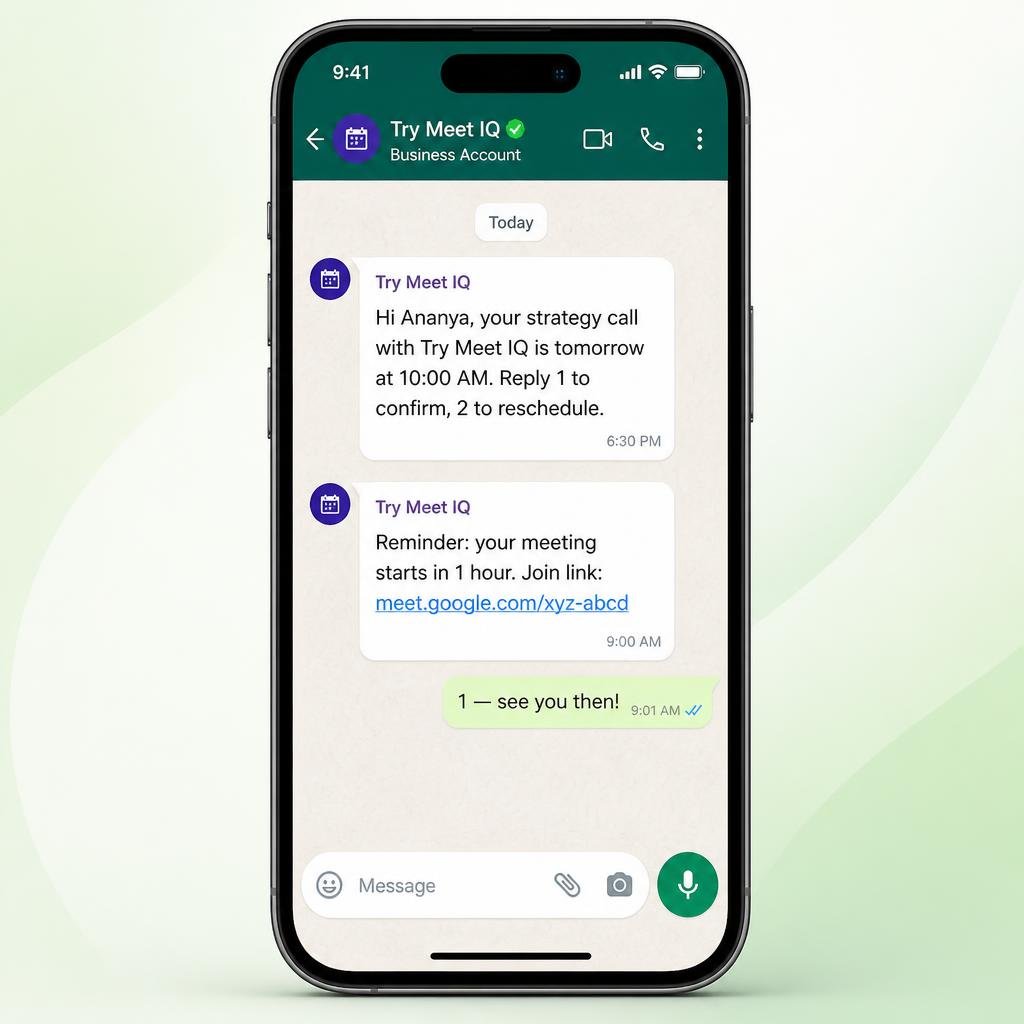
Easy enough for solo professionals, robust enough for consultants, coaches, and service businesses.
Try Meet IQ connects up to six calendars to automate scheduling with real-time availability, so you never get double-booked.
Google Meet links are generated automatically for every confirmed booking, and updated whenever a meeting is rescheduled.
Email and WhatsApp reminders keep no-shows down without a single manual follow-up message.
Try Meet IQ goes way beyond a link, with customizable, automated features to help you achieve goals faster.
Sign up for freeBoost productivity with the integrations your workflow already depends on.
Real-time two-way availability sync.
Conference links on every booking.
Confirmations, reminders, follow-ups.
Reminders where clients actually reply.
Quickly find and share scheduling links from your inbox, CRM and more — while Try Meet IQ handles confirmations, reminders and rescheduling in the background.
Availability is computed from your connected calendar and rules, so you stay in control of every confirmation.
Start free, upgrade when you need WhatsApp reminders and automated follow-ups.
Google Meet • Ready to connect
₹0 Free forever
₹700 /month
Valid for 30 days
₹6,000 50% OFF
₹2,999 /year
Valid for 365 days
Keep your scheduling data secure with encryption, access controls, security monitoring and privacy protections.
Everything you need to know about scheduling, reminders and billing.
The free plan includes Booking & Google calendar integration. Whatsapp remiders are on premium plans.
When someone books, Try Meet IQ collects their phone number and sends confirmations plus timed reminders — typically 24 hours and 1 hour before the meeting — to their WhatsApp number automatically.
Every reminder is linked to the booking. If the time changes, pending reminders update automatically; if it is cancelled, they stop and both sides get a cancellation notice.
Google Calendar syncs availability in real time and Google Meet links are generated automatically for every confirmed booking.
Yes. You can edit the wording, timing and number of reminders for each event type, so the messages match your brand and workflow.
Data is encrypted in transit with HTTPS/TLS, access is role-controlled, and Google user data is handled in line with Google’s Limited Use requirements. Read more on our security page.
Yes. Plans can be upgraded, downgraded or cancelled at any time from your workspace billing settings.
Questions about plans, integrations or reminders? Send us a message and we'll get back to you.